Run it yourself
From knowing nothing to your own transcontinental video phone.
That is the stated goal of the series, in the first minute of the first video, and everything below is arranged to get you there. Hardware, installation, discovery — then the two videos that explain how the wire got small enough for the call to fit. Nothing here is a pitch. It is a man at a keyboard, narrating what is actually on the screen, including the parts that misbehave.
Installation, part 1 — frognet_install, the prompts, the pond.
Installation, part 2 — first boot, routes appearing, the node online.
Eleven recorded · five still to shoot
Before you start — what you need in front of you
You are building a real distributed network, so there is a real minimum to build it out of. A single node talking to itself proves nothing you came here to see.
- Two or more hosts. Debian Bookworm on a Raspberry Pi 4 or 5 with 2 GB is the reference. Macbooks and Core i7 boxes work too. Requirements are NetworkManager, dnsmasq, Python 3, and at least one external interface.
- Optionally a router per node, in AP mode. Without one, FrogNet takes the Wi-Fi chip and projects the SSID itself. With one, you get range and speed — and it has not mattered what brand, from travel routers to Asus gaming kit to Decos.
- Two separate LANs, if you want the interesting part. Two boxes on one switch will run. Two genuinely separate networks joined through a broker is where the behaviour worth watching lives.
Start with nothing. Finish with a network that found itself.
In order — each one ends where the next begins. Nothing here asks you to understand a protocol. It asks you to plug things in and watch what happens.
What this is, and what you will have at the end
What FrogNet is — a fabric, an underlying core component, not an application. Where it came from: fifty years of client-server work and the repeated wish for a standalone network you could stand up anywhere, without asking a corporate help desk for root. What it stands up is a local area network with no upstream and no connectivity requirement, and two of them can be joined across the country through a broker.
"I’m not saying that I have the best or the only way to do something or even, you know, a good way, right? But I will say is that I have a way."
— Welcome, 29 JulPretty basic, on purpose
Debian Bookworm on a Pi 4 or 5, or a Macbook, or a Core i7. NetworkManager, dnsmasq, Python 3, and at least one external interface — Ethernet or Wi-Fi. It will use as many ports as you fill: a router on Ethernet plus two Wi-Fi radios gives one box three points of connectivity. Then the router question, answered by demonstration rather than specification — a travel router in AP mode, a Deco mesh unit, a long-range unit claiming a kilometre, and Dan’s 900 MHz antenna in New York that has been driven around in the back of a car. Find new uses for old hardware.
"We deal with reality, not what we wish it was."
— Hardware Requirements, 29 JulOne file, two machines, and a reboot that matters
A single 1.2 GB release tarball, untarred to yield the world archive plus the installer and the reset script. Two machines are done at once — an in-place update with --preserve on one, a full replacement on the other — with the network monitor open on a third the whole time, so you watch the replaced node get marked down by the rest of the network while the updated one keeps answering. The installer qualifies the box, fills in dependencies, runs the pre-activation simulator against the real hardware, sets up MariaDB and the interfaces, then asks for the node identity, the gateway address, the SSID and country code, and whether this box is an internet gateway.
The tunnel out, and reaching another site
Standing up a broker on a small VPS with a fixed public address, pointing two ponds at it, and watching them behave as one network across the country. This is the mechanism the Communicator runs over.
Finding out who your neighbours are, without DNS
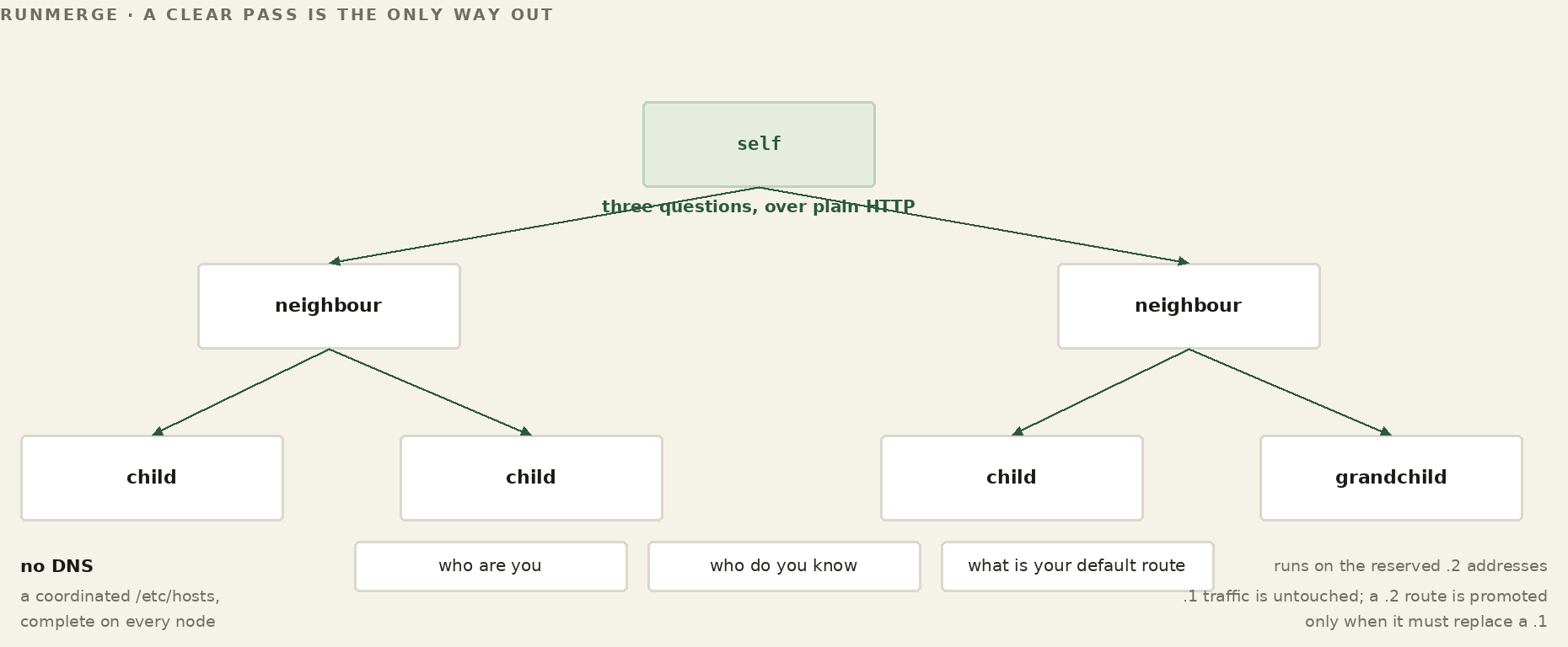
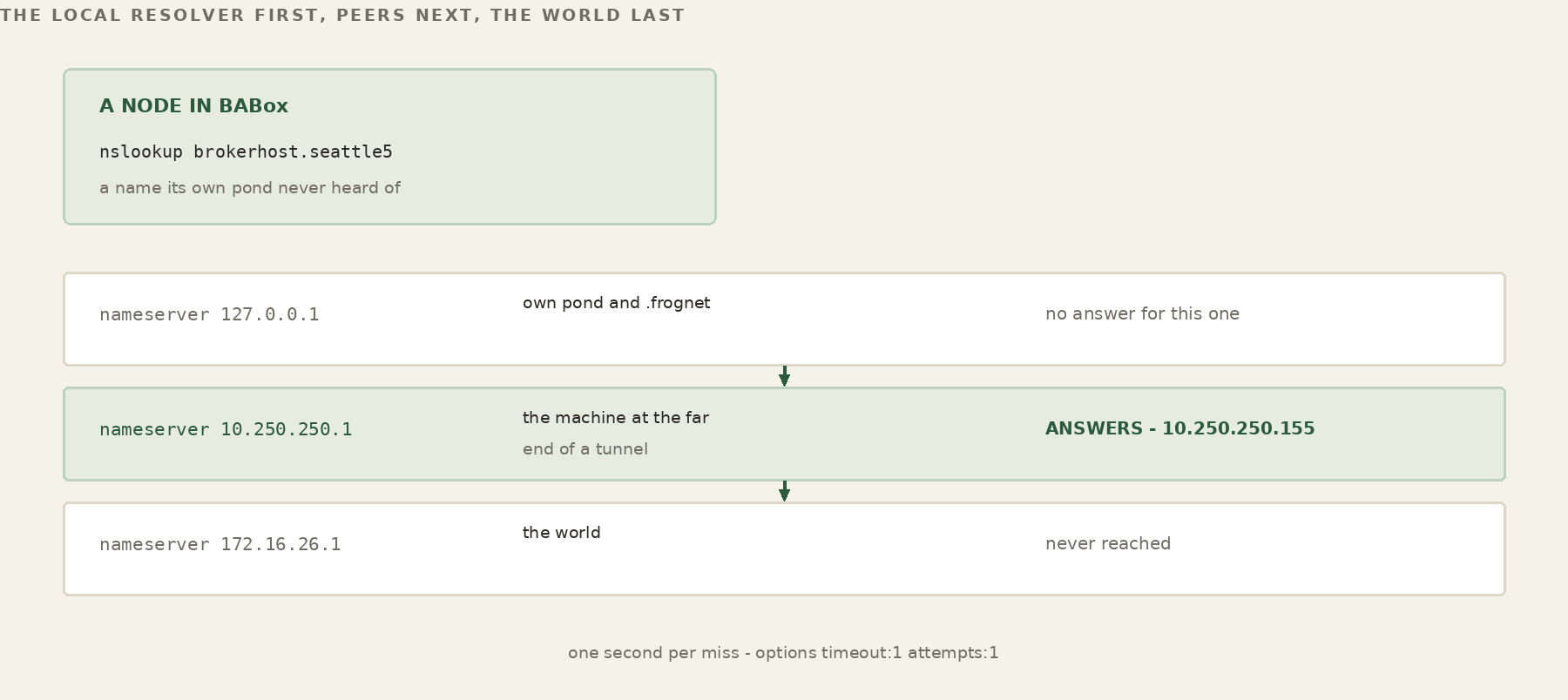
There is no authoritative upstream — deliberately — so there is no DNS. Name resolution is a coordinated /etc/hosts, complete on every node, maintained over plain HTTP. Every node answers three questions about itself: who are you, who do you know, what is your default route. runmerge asks its neighbours, then their children, then their grandchildren, installing a route for each new one, and does not exit until one full pass changes nothing. All of it runs on the reserved .2 addresses so nothing in flight on .1 is touched; a .2 route is promoted only when it must replace a .1. It fires on network events. It does not poll.
"Every merge is a complete drop and rediscovery from scratch. We don’t maintain any history."
— Merge, 30 JulTwo videos on the thing that makes the rest possible.
These sit between the setup and the model. One explains how kilobytes become bytes; the other hands you the tools to measure it on your own pond, and leaves the anomalies in.
How kilobytes become bytes
Apache gets displaced. A proxy listens on port 80 for the whole network, an iptables rule traps everything through the .1 box, and hop-local traffic is handed to the engine. Both ends learn a template — static elements and dynamic elements — keyed on the path rather than the destination, so one template serves all nodes. From then on a message is a SAME, a DIFF, or a RAW when there was no template to begin with. The proxy and daemon hold one permanently open socket pair, and identical requests in flight are never issued twice: the daemon calls Apache once and answers every waiting thread from the single reply.
"Once you’ve got it open, there’s no reason to close it if what you’re doing is sending information back and forth between these two proxies."
— Semantic Compression, 30 JulMeasure it yourself, anomalies included
frognet_monitor reads the network from one node’s point of view: online, degraded, idle or down, where degraded means an RTT past 250 ms, with P50 and P95 and the template hit ratio beside it. Then pipe_workload against a target — echo, 300 requests, straight at Apache on 8080 and then through the engine on port 80. 4.6 against 8.6 requests a second, for the same work. Burst runs reach 20.5 requests a second against one remote node and 66.5 against another — both across the internet; neither is a directly connected machine. The chat workload forces roughly a fifth non-repeating traffic so DIFF has to work: 138 SAME, 145 DIFF, 17 failed, 20.1 MB saved.
The ramp test climbs and then drops back, repeatably, and is named on camera as unexplained and worth investigating. It stays in.
"So just by going to semantic compression, we get nearly double."
— System Perf, 30 JulNow make the call.
This is the end of the short path. Purely mechanical — set the Communicator up, use it, talk to someone at the other end. No model, no implementation, no mechanism. If a working call is all you came for, you can stop here and be finished.
Set it up, and talk to someone
Installing it, pointing it at your pond, and placing a call across the network you built in the videos above. Live video with audio prioritised above the picture, holding on a 900 MHz link at 850 kbps — which is the goal named in the first minute of video 01. You will not be told how it does that, and you don’t need to know to use it.
Two that stand alone.
Neither is a rung. Watch the security one whenever you like — it depends on nothing above it.
Built in at the architecture, not bolted on afterwards
The framing first: the certificates and the scrambling are all a response to putting research networks on the internet and getting attacked, which surprised some of the people who built them. Then what FrogNet does instead. The broker needs one exposed address and port, and those are yours — you choose where they live and what the numbers are. The port runs WireGuard, which does not answer a scan without credentials. Data crosses the gap by air-gapped file drop rather than an open connection: text into a watched directory, validated on the inside, the answer dropped back. Past that you need physical proximity, and then the traffic on the wire is BLDC-1 over FNWP, not sniffable HTTP.
"Security has been built in from the beginning. It’s there in the architecture."
— Security, 3 AugBuilding and shipping a release
frognet_build_release, which collects a whole configured system into the single archive you move to every other machine. This video is that process on its own.You have a running network and a working call. Here is what’s next.
Stopping here is a complete outcome, and the intended one for plenty of people — a working pond, measured with your own tools, and a call across it. If you now want to know why the call held, that is the other path.
01 · to run it for real
Take the developer licence
Free for development, personal, and community use. No seats, no expiry, no telemetry. You need this to keep going — it takes a minute and there is nothing to pay.
Ask for a licence →02 · to understand it
The long path
Where the data lands, then what it turns out to be, then what that lets you stop writing:
- Sensors
- FrogNet Memory
- Intro to UnREST
- Tuple space
- Services
- The Communicator, from the inside
A different thing from what you just did. The last two are still to be recorded.
Start the long path →03 · to build on it
Join the guild
A messiah has followers; a journeyman has a guild. If you got a network running and immediately found something you’d have done differently — that is the contribution. Better is demonstrated, not argued.
See the seams →Eleven of the sixteen are recorded. Five remain — internet and the broker, release media, services, and the Communicator twice over, once mechanically and once from the inside — and video 03 is a placeholder cut awaiting a reshoot. The sequence is fixed; recordings land here as they are finished.